
Luksgazino Sign Up: Phone Versus Email Registration
There are two ways to open a Luksgazino account. The table below compares them. The form is short and takes a few minutes. Once done, you log in with the same details on the login page.
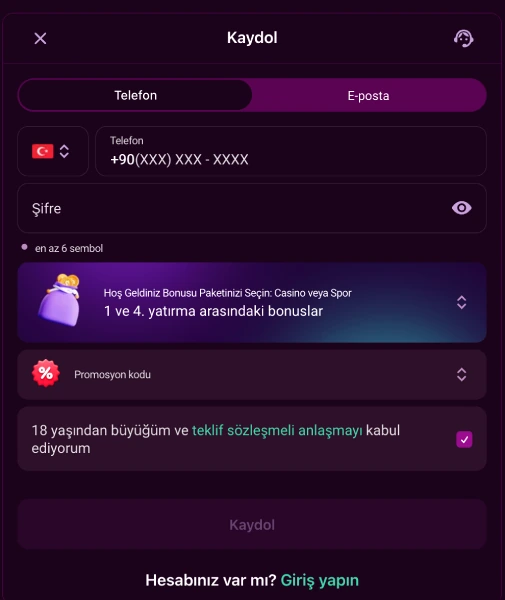
Phone or Email: Which to Choose
- Phone tab.
- Country code (default +90) and a number in +90(XXX) XXX-XXXX format.
- Email tab.
- A valid email address is all that is required.
The tab you pick also decides how you log in later. Phone is faster if you check messages easily. Email suits you if you check that inbox more often.
The Rest of the Form
Once you pick a tab, the remaining fields are the same for both methods.
- Password.
- Must be at least 6 characters, with a show/hide toggle on screen.
- Welcome package selection.
- Choose between the Casino package, the Sport package or no bonus.
- Promo code.
- Enter one if you have it, this field is not required.
- Consent checkbox.
- You confirm you are over 18 and accept the offer agreement.
The "Sign Up" button stays disabled while required fields are empty. It needs a password, a contact detail and the checkbox.
Identity Verification (KYC): Document Types
The form asks for your name and identity details. Writing these in Latin characters helps. A separate step comes before a withdrawal request. This step runs through an independent provider called KYCAID.
- ID card.
- Select the ID card type and upload the document.
- Passport.
- Photograph the passport page and upload it to the system.
- Driving licence.
- Select this type and upload it the same way.
You can upload from a computer or finish the step from your phone. After picking a type, you submit the file with the "Submit" button.
Registration Versus Withdrawal Eligibility
Registering is not the same as gaining withdrawal rights. Three steps must be complete before a withdrawal.
| Step | What It Confirms |
|---|---|
| Phone confirmation. | Verifies your registered phone number. |
| Email confirmation. | Verifies your registered email address. |
| First real-money deposit. | Your first deposit made with real funds. |
Withdrawal requests are not processed until all three are done. You can track this from your account panel.
An Extra Login Option After Registration: Account ID
At registration you only enter phone or email. After the account opens, this changes. The system assigns your account an account ID number. On the login page you can use that number with your password.
Desktop Versus Mobile Registration
- Desktop browser.
- You go straight to the form, with the same fields as mobile.
- Android.
- You first install the APK via QR code, then fill in the form.
- iOS.
- You reach the form through the "Add to Home Screen" shortcut in Safari.
The registration steps stay the same on both mobile routes. Only how you reach the form differs. Setup steps are on the mobile app page.
One Account per User and Age Limit
Under the rules, one person may open only one account. A second account with different phone or email details still breaks the rule. Transfers between accounts are not allowed. Withdrawals are made through the same method you used to deposit.
The checkbox on the registration form is a declaration that you are over 18. If you want to pause your account, you can send a request once every 90 days. The request must come from your registered email. A new request needs at least 30 days after the last one.
After Registration: The Trial Bonus
New users who complete phone and email confirmation gain one benefit. That benefit is the 500 TRY trial bonus. No deposit is required for it, only contact confirmation. Once confirmed, you can make your first real deposit. Pick a method on the deposit page. General information about the platform is on the homepage.
Frequently Asked Questions
Should I register by phone or by email?
Both are valid. You use the same detail for login that you chose at registration.
Which documents are needed for verification after registration?
Verification runs through KYCAID; an ID card, passport or driving licence is enough.
Can the same person open more than one account?
No. Under the rules, each user may open only one account.
Can I withdraw right after registering?
No. Phone confirmation, email confirmation and a first real deposit must be done first.
Do I need to deposit to get the trial bonus?
No. The 500 TRY trial bonus does not require a deposit.
Frequently Asked Questions
Should I register by phone or by email?
Both are valid. You use the same detail for login that you chose at registration.
Which documents are needed for verification after registration?
Verification runs through KYCAID; an ID card, passport or driving licence is enough.
Can the same person open more than one account?
No. Under the rules, each user may open only one account.
Can I withdraw right after registering?
No. Phone confirmation, email confirmation and a first real deposit must be done first.
Do I need to deposit to get the trial bonus?
No. The 500 TRY trial bonus does not require a deposit.